
Download Turtle Beach VelocityOne Tuner – Flight Control Customization, Gaming Controller Settings, Remap Buttons, Update Firmware, Adjust Performance, Lighting Effects, Game Controller App, Flight Simulator App, Gaming Tool
Overview
The Turtle Beach VelocityOne Tuner is a mobile application developed by Turtle Beach to enhance the functionality and personalization of the VelocityOne flight control system. Designed specifically for gamers who rely on precision and responsiveness in flight simulation and action-based gaming, the app enables users to fine-tune their control experience directly from their smartphone or tablet. By offering tools to adjust performance parameters, remap controls, and customize lighting, the app ensures that players can adapt their hardware to match their unique gaming style and environment.
Target users include flight simulation enthusiasts, competitive gamers, and hobbyists who value customization and control optimization. The app serves as a central hub for managing firmware updates, ensuring that users always have access to the latest improvements and stability fixes. This makes it particularly valuable in an ecosystem where hardware performance directly impacts gameplay outcomes.
Although the developer did not provide additional technical details about the app’s architecture or backend systems, its role in extending the capabilities of a specialized gaming peripheral underscores its importance in the broader gaming accessory market. Real-world use cases include adjusting force feedback for realism in flight simulators, remapping paddles for faster in-game actions, and synchronizing lighting with game themes for immersive gameplay. The app’s release in January 2024 marks a significant step toward smarter, more adaptable gaming peripherals.
Key Features & Functionality
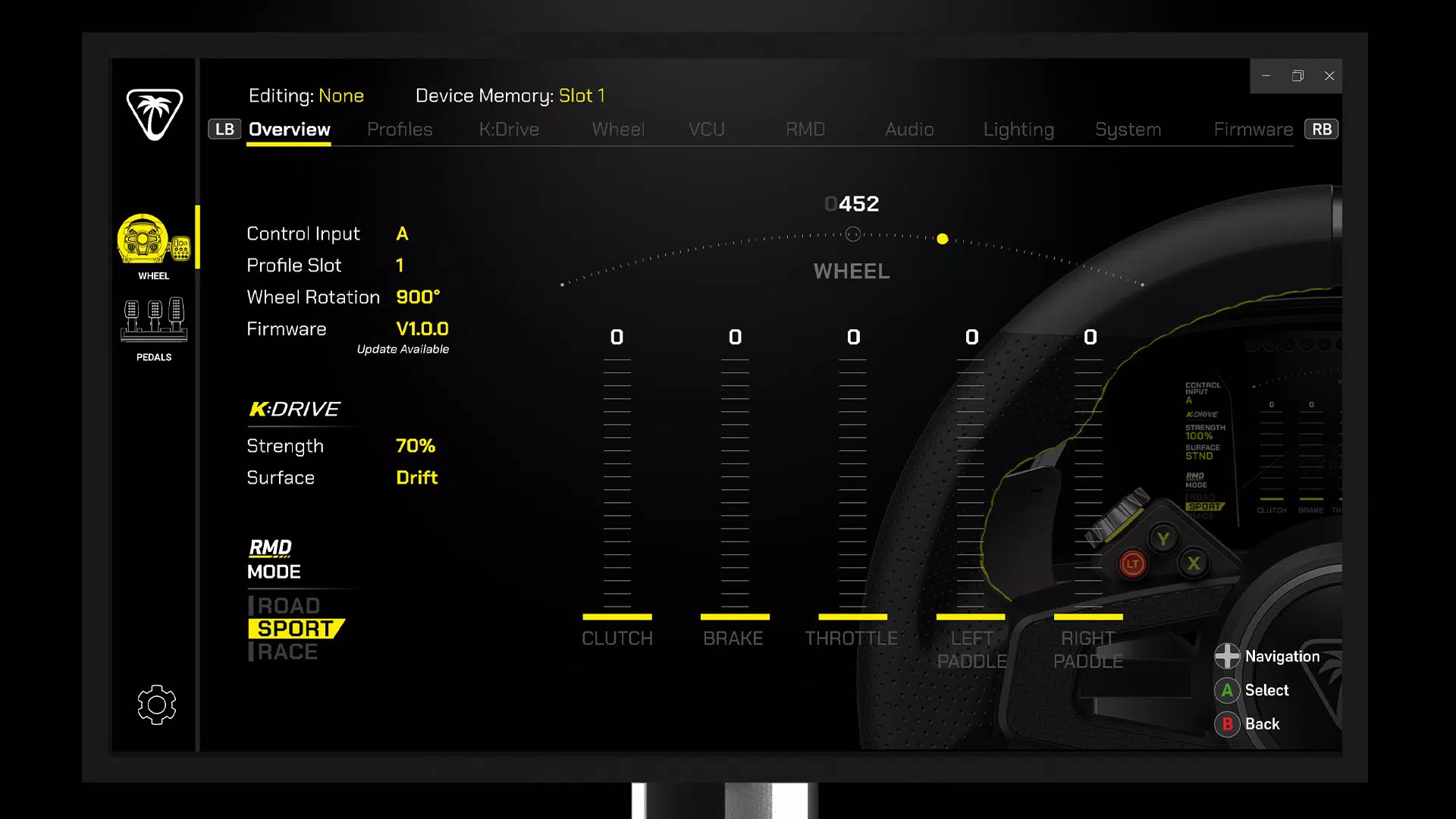
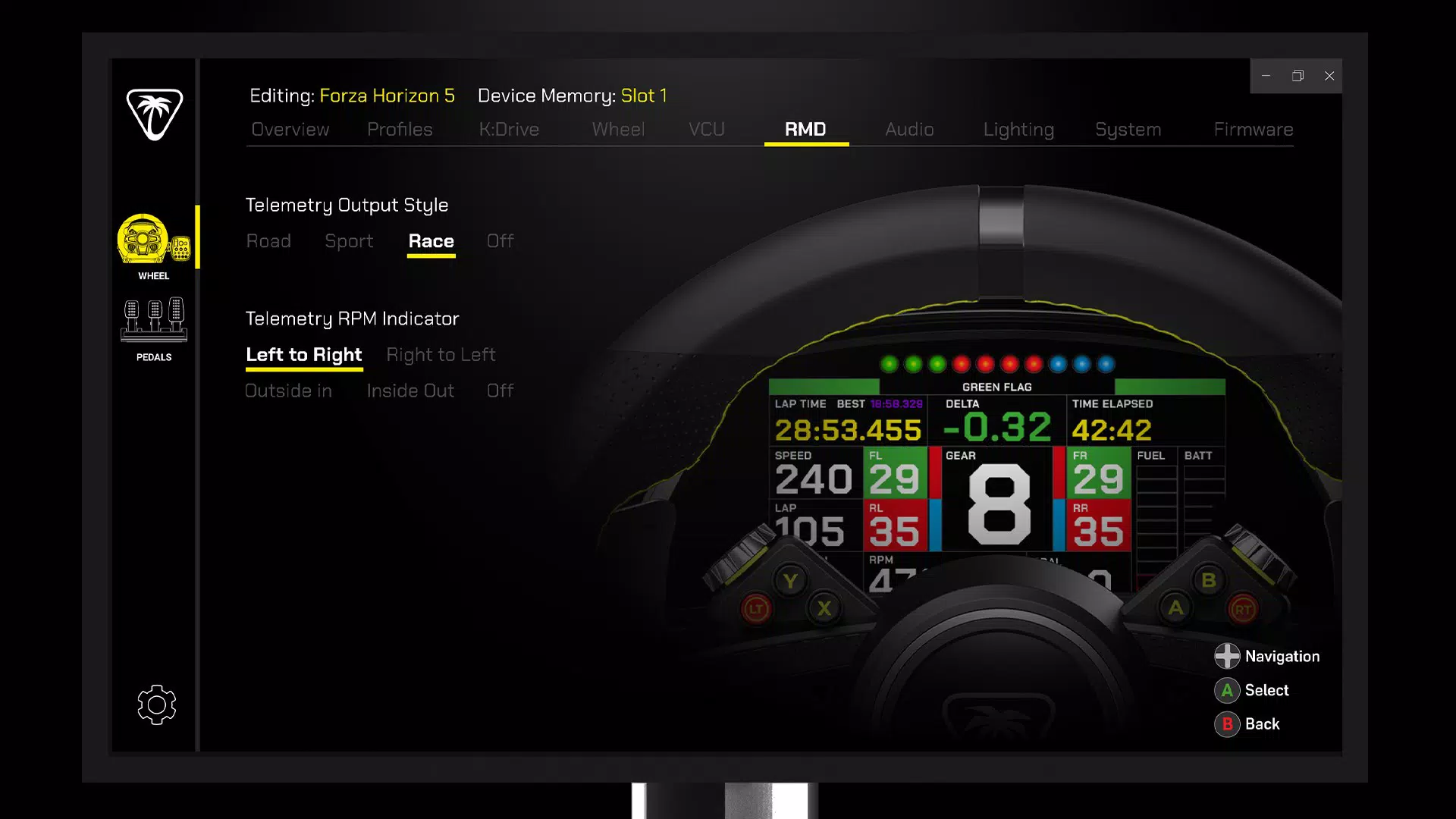
- Performance Adjustments: Users can modify response curves for force feedback and braking, allowing for a more tailored control feel. This is especially useful in flight simulators where subtle changes in resistance can affect maneuverability and realism.
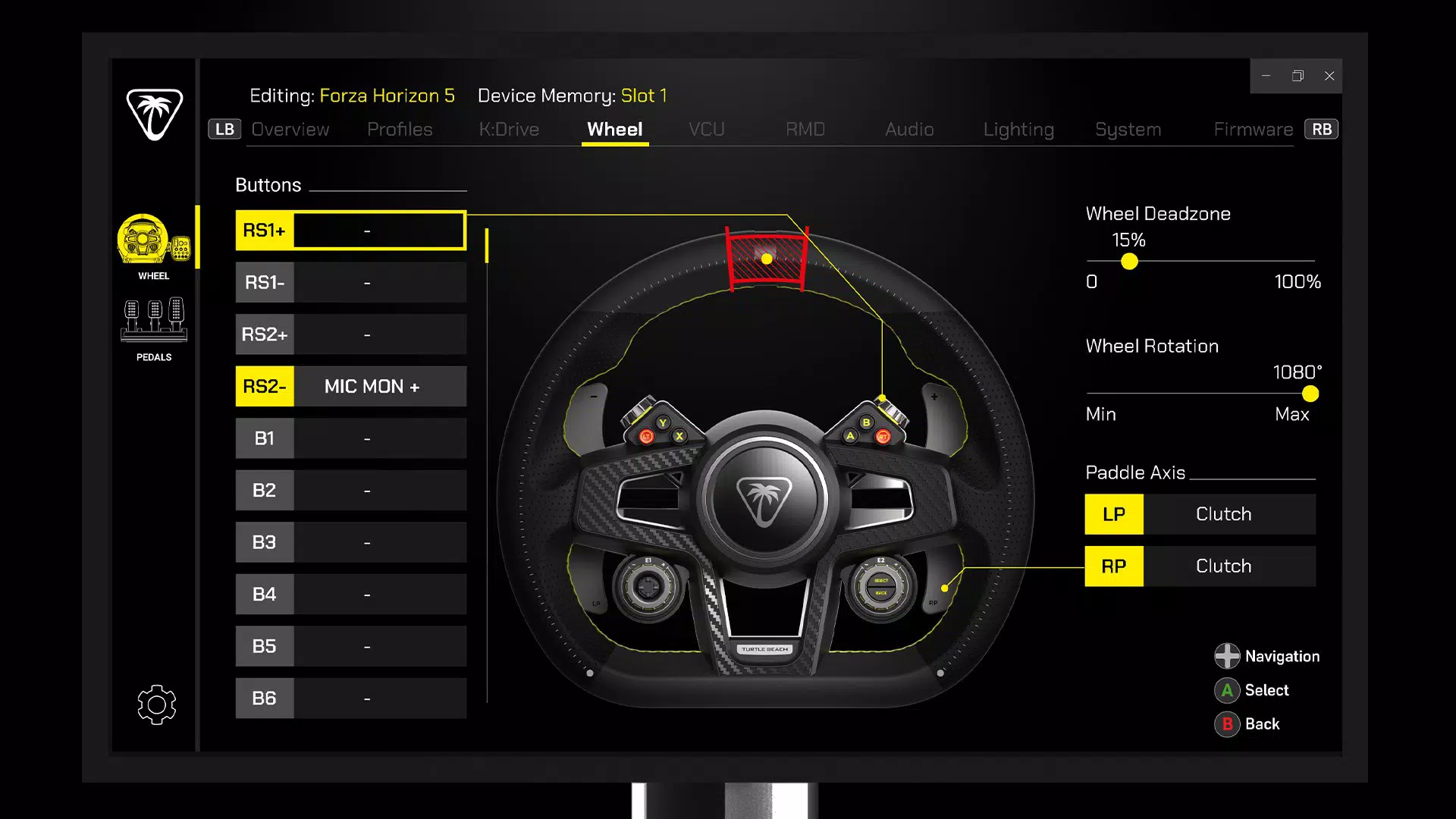
- Custom Remapping: The app supports reassigning buttons and paddles to different in-game actions, enabling players to create custom control schemes that suit their preferred playstyle or accommodate physical limitations.
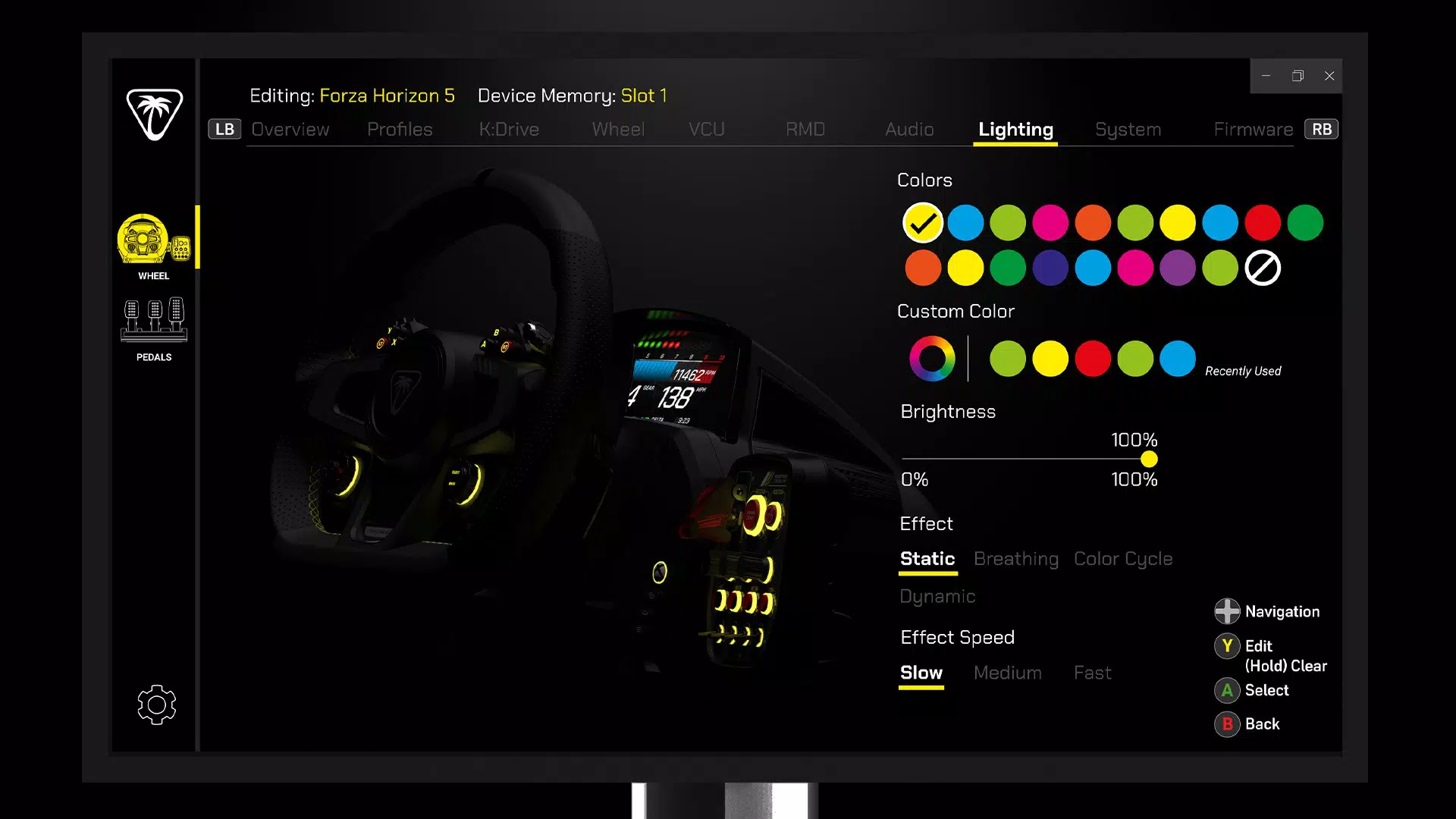
- Lighting Customization: With adjustable colors, brightness levels, and dynamic lighting effects, users can personalize the visual aesthetic of their VelocityOne to match their gaming setup or the mood of a specific game.
- Easy Product Updates: Firmware updates are delivered seamlessly through the app, ensuring the hardware remains compatible with new games and features without requiring additional tools or complex procedures.
- Future Expansion Support: The app is designed to support upcoming content and enhancements, providing a scalable platform for evolving gameplay needs and future peripheral integrations.
For example, a player using the VelocityOne in a high-stakes flight simulation might use the performance adjustment feature to reduce force feedback delay, improving reaction time during dogfights. Similarly, a competitive gamer could remap frequently used commands to more accessible buttons, reducing input lag during intense sequences. These features collectively empower users to transform their gaming hardware into a fully personalized tool.
Interface, UX & Performance
The Turtle Beach VelocityOne Tuner features a clean, intuitive interface designed for quick access to core customization tools. Navigation is structured around clearly labeled sections, allowing users to switch between performance settings, remapping options, and lighting configurations with minimal effort. The visual layout emphasizes functionality over ornamentation, prioritizing clarity and ease of use.
Although the developer did not list formal performance metrics, the app appears to operate smoothly across a range of Android and iOS devices. Users can expect responsive interactions when adjusting sliders or selecting lighting presets, with minimal delay between input and visual feedback. The app maintains stability during extended sessions, such as when configuring multiple settings or preparing for a long gaming marathon.
Responsiveness is consistent across different device categories, including mid-tier smartphones and tablets. The app does not report excessive battery drain or memory usage, suggesting efficient background handling. However, specific performance benchmarks or compatibility details were not disclosed by the developer.
Platform Compatibility & Technical Requirements
The Turtle Beach VelocityOne Tuner is available on both Android and iOS platforms, making it accessible to a wide range of mobile users. The app requires a device running the latest supported versions of these operating systems, though specific minimum OS requirements were not listed by the developer.
With a file size of 15.2 MB, the app is lightweight and can be installed on devices with limited storage. The current software version is 1.0.0, indicating a stable initial release. The app is free to download and install, removing financial barriers to entry for users interested in customizing their gaming controls.
Compatibility information was not fully disclosed, so users are advised to ensure their device meets the necessary standards for Bluetooth connectivity and peripheral pairing. No additional permissions or hardware requirements were specified.
Pros and Cons
Pros
- Free to download and install, offering full access to core customization features.
- Lightweight design at 15.2 MB, suitable for devices with limited storage.
- Supports both Android and iOS, ensuring broad platform accessibility.
- Provides seamless firmware update capabilities for ongoing hardware optimization.
- Offers advanced customization options for performance, remapping, and lighting.
Cons
- Specific OS version requirements were not provided by the developer.
- Advanced features may require a compatible VelocityOne flight control system, which is not included with the app.
- No information on background processes or battery impact was disclosed.
- Users may need to manually verify compatibility with their device’s Bluetooth version.
- Limited public documentation or support resources were referenced in the provided data.
FAQ
Is the Turtle Beach VelocityOne Tuner available for both Android and iOS?
Yes, the app is compatible with both Android and iOS devices, allowing users on either platform to customize their VelocityOne flight control system.
Do I need a specific controller to use this app?
Yes, the app is designed to work exclusively with the Turtle Beach VelocityOne flight control system. It does not support other gaming peripherals.
Can I update the firmware of my VelocityOne through the app?
Yes, the app includes built-in firmware update functionality, allowing users to download and install the latest improvements directly from their mobile device.
Is the app free to use?
Yes, the Turtle Beach VelocityOne Tuner is currently available at no cost. There are no in-app purchases or subscription fees reported.
Does the app require internet access?
While the app may function offline for basic settings, internet access is required to download firmware updates and access future expansion content.
Final Thoughts
The Turtle Beach VelocityOne Tuner delivers a focused, high-value experience for gamers invested in precision control and personalization. By offering deep customization of performance, remapping, and lighting, it transforms the VelocityOne from a standard flight controller into a dynamic, adaptive tool. Its free availability and lightweight design make it accessible to a broad audience, while its seamless update system ensures long-term usability.
While some technical details remain undisclosed, the app’s clear purpose and practical functionality stand out in a market where peripheral customization is increasingly expected. Whether you're a flight simulator enthusiast or a competitive gamer seeking an edge, the app provides tangible benefits through intuitive design and powerful features.
Download Turtle Beach VelocityOne Tuner now


